What We Handed to a Framework, and What We Kept
Moving the flower shop agents to PydanticAI, FastMCP and Prefect, and giving them their first job that runs on its own
In October I moved the flower shop agents' tools onto an MCP server. In that post I kept my own agent loop, the code that sends a task to the model, runs the tools it asks for and repeats until the model is done.
This month I replaced that loop. The flower shop agents are now built with PydanticAI, and each request runs inside a Prefect flow. The shop's tools are still served by FastMCP, so the stack is now PydanticAI for the agents, FastMCP for the tools and Prefect for running them. I also added the first agent that runs on a schedule without anyone asking: a weekly sales note for the shop owner.
What changed and what didn't
The tools didn't change. tools.py is still a FastMCP server, and you can still run it on its own and connect any MCP client to it.
What changed is the other end of that connection. Before, I listed the server's tools, converted each one into the format the Anthropic API expects and ran the loop myself. Now PydanticAI does that. Its MCP toolset uses FastMCP's client under the hood, so the code I wrote to translate tool definitions is gone. The workers, their job descriptions and the coordinator are the same as before.
I made this change because the loop is the part of an agent system that frameworks handle well, and it's the part that needs updating every time model APIs change. I'd rather spend that time on the parts that are specific to a client's business.
Keeping the rules in our code
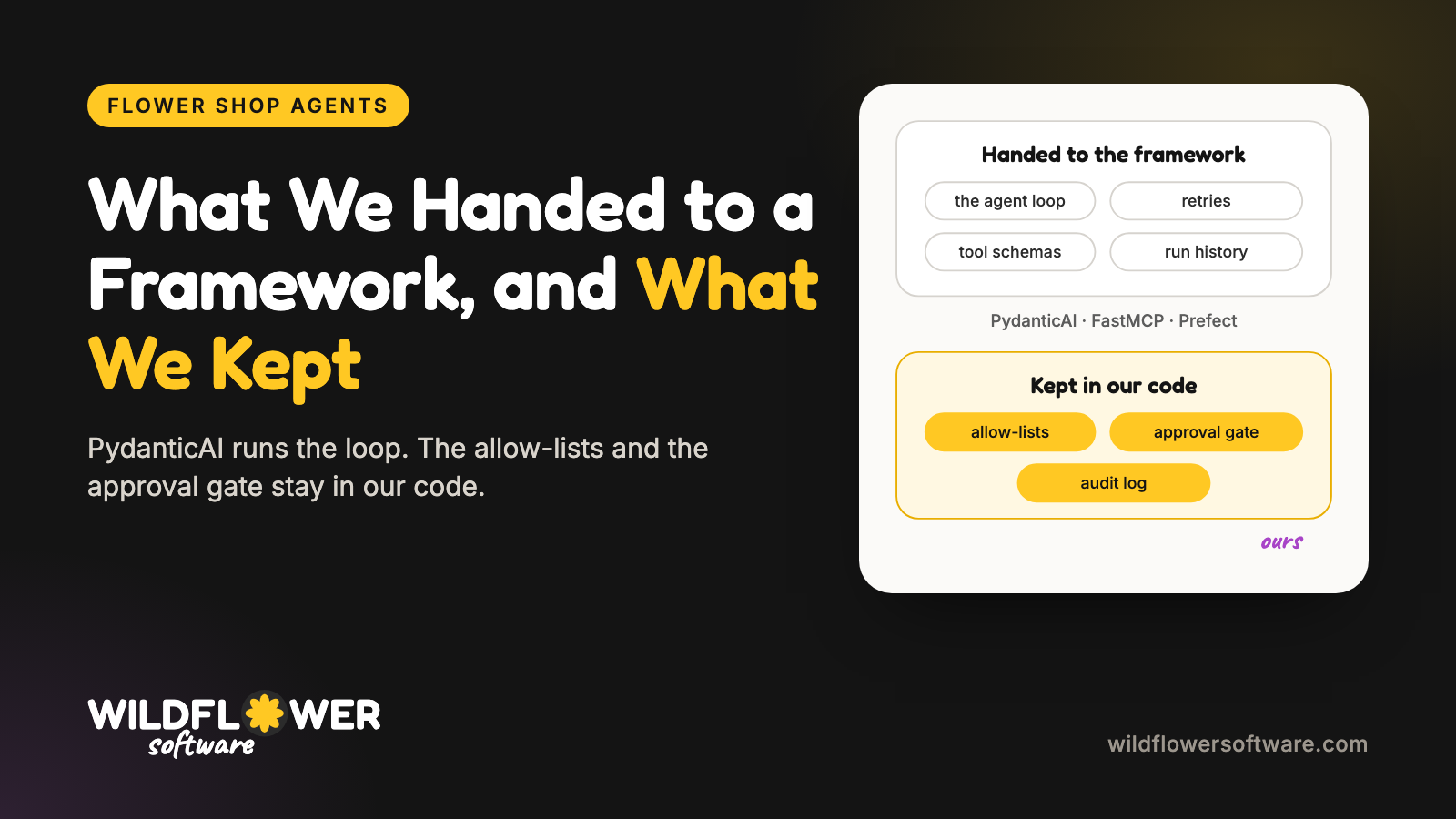
There were two things I wasn't going to hand to a framework:
- Each worker's allow-list. The inventory worker can check stock and draft a wholesale order. It can't send a customer email.
- The approval gate. Anything that spends money, makes a commitment to a customer or posts publicly waits for the owner.
Both of these need to hold even when the model gets something wrong. So they stay in code that we own and test, not in a prompt.
PydanticAI made this easier than I expected. An agent's tools come from a toolset, and you can wrap one toolset inside another. The allow-list is a filter on the MCP toolset, and the gate is a wrapper around that:
shop = MCPToolset(server, id=f"{worker.name}-shop")
gated = GatedToolset(
    shop.filtered(lambda ctx, tool_def: tool_def.name in allowed),
    worker=worker.name,
)
class GatedToolset(WrapperToolset[ShopDeps]):
    async def call_tool(self, name, tool_args, ctx, tool):
        return await ctx.deps.gate.submit(
            worker=self.worker, tool=name, args=tool_args,
            run=lambda: self.wrapped.call_tool(name, tool_args, ctx, tool),
        )
A worker never sees a tool outside its job. Read-only tools run right away. A risky call is added to the owner's queue and never reaches the MCP server, and the model is told the action has not been carried out, so its report says "waiting for approval" rather than "done."
The list of tools that can run without approval is still in approval.py, not on the server. MCP lets a server describe a tool as read-only, but the spec says clients shouldn't trust that, and our tests check that a server can't mark its own tool safe.
How durable is it?
Prefect is there to run the agents and keep a record of each run. PydanticAI connects to it through a feature called PrefectDurability. (The older PrefectAgent wrapper is deprecated, so check the current docs if you're following an older guide.)
Inside a flow, every model call and every MCP tool call becomes a Prefect task with its own retries. A failed model call is retried up to three times before the run fails. When a run does fail, I can open it in Prefect and see which step broke and what it was given. Prefect also saves the result of each finished step, which is what lets a retried run pick up where it stopped instead of repeating model calls. That needs a Prefect server or Prefect Cloud to keep the results, and I haven't tested resuming a failed run yet.
One part isn't durable yet: waiting for the owner. After a run, the queued actions sit in memory until she approves or rejects them at the terminal. The audit log keeps a record of everything, but if the process stops before she answers, the queue itself is gone. Approvals that can wait hours or days for her are their own piece of work, and I haven't built that yet.
A side note for anyone trying this: once durability is on, PydanticAI won't let an MCP call run outside a Prefect task. That worked well with our gate. The gate sits outside the MCP toolset, so approved calls run as tasks and queued calls never become tasks at all.
Always on
When people ask me about "always on" agents, they often picture an agent running in a loop all day. That's not how I build them. An always-on system is a small service that's always running and starts the right agent when something happens: a schedule comes due, a message arrives, or a number crosses a line. Each agent run is short, and the state lives in a database, not in the model's context.
The flower shop now has its first piece of that. Every Monday at 7:00, before the owner's weekly review, an agent writes her a short note on how sales are going.
The note follows a rule I use on every project: the model decides what to say, and code does the math.
- A script compares the last four weeks with the four weeks before and the same weeks last year, and flags days that are far from normal for that day of the week.
- A PydanticAI agent with no tools writes the note from the script's output.
- Code checks the note before it's saved. Every number has to come from the script's output. If the data is placeholder data, the note has to say so. It can ask the owner at most one question, and it has to be short enough to read on a phone.
- The note is saved as a draft. Nothing is sent.
If a note fails a check, it goes back to the model with the reason. If it still fails, the run fails and nothing is saved. I'd much rather see a failed run in Prefect than have the owner get a text with a number nobody can trace.
This lives in a new folder in the repo, shop-ops. It holds the shop's sales, recipes, suppliers and seasonality, modeled on a real Philadelphia shop. For now it holds four years of placeholder history, and every generated row is marked as placeholder.
Where it runs
For now we deploy to Render. I first tried a Render cron job, since the note runs once a week for a couple of minutes, but Render cron jobs can't attach a persistent disk, so they can't reach the database file. The setup in render.yaml is one small background worker with a 1 GB disk. It stays running and waits for the schedule, which Prefect Cloud keeps along with the run history. At the time of writing that's about $7 a month. When the shop's texting assistant arrives, two services will need the same data, and the database will move to Render Postgres.
If cost is a concern, or you want to test without an API key, the agents can also run on a local model. The --local flag points PydanticAI at llama.cpp's llama-server, which accepts the same API format as Anthropic's:
AnthropicModel("local", provider=AnthropicProvider(base_url=LOCAL_URL, api_key="local"))
I ran it with Qwen3.5 9B on my Mac and asked which stems need to sell first and whether to place a wholesale order. The inventory worker called the shop's tools over MCP, the coordinator wrote the answer, and it took about four minutes. Most of the answer was right. It also listed a "priority sale flag" as waiting for approval, which didn't exist. Nothing had been queued. Smaller models make more mistakes like that on multi-step work, which is one more reason the allow-lists and the gate are in code: a model can describe something incorrectly, but it can't carry out an action the owner hasn't approved.
Up next
- Evals for each worker. When a prompt, skill or model changes, I want each worker graded on the tools it called and what it changed, not only on how its answer reads.
- Observability. Prefect shows each run step by step. Next I'll add OpenTelemetry traces next to the audit log, so one request can be followed from the owner's question to every tool call.
- A sandbox. The agents will run inside a sandboxed runtime with limits on files, network access and credentials, so the rules hold at the infrastructure level as well as in our code.
The code is in wildflower-software/flower-shop-agents. The READMEs cover running it with uv, with Prefect, on a local model and on Render.
If you want agents that use a good framework while your business rules stay in code you control, that's the work Wildflower Software does for small businesses and enterprise teams. Get in touch and tell me what your agents should never do on their own.